

Part 1: Key Takeaways
1. What Is HDR vs UHD?
UHD (Ultra High Definition) refers to resolution, typically 3840×2160 pixels, meaning more image detail and sharper visuals.
HDR (High Dynamic Range) refers to image quality, enhancing contrast, brightness, and color range for more realistic visuals.
2. Key Differences
- Focus: UHD improves clarity; HDR improves realism
- Resolution: UHD defines pixel count; HDR does not change resolution
- Brightness & Contrast: HDR offers higher brightness and deeper blacks
- Color Performance: HDR displays wider and more accurate colors
- Visual Impact: HDR is often more noticeable than UHD to the human eye
3. Which Is Better?
- Large screens or close viewing: UHD is better for sharpness and fine detail
- Immersive visuals and video contents: HDR delivers a more dramatic improvement
- LED displays and event screens: HDR + UHD together provide the best experience
- For budget-limited users: UHD alone still offers a clear upgrade over standard HD
KEY NOTES:
- UHD defines how sharp the image is.
- HDR defines how good the image looks.

Part 2: Introduction
When shopping for a new display or LED screen, you may often see terms like 4K UHD and HDR used together.
This leads many users to ask: Are UHD and HDR the same thing? And if not, which one actually matters more for image quality?
In reality, HDR vs UHD is not a comparison between two competing technologies. Instead, they focus on different aspects of visual performance.
- UHD determines how sharp an image looks.
- HDR controls how real and vivid the image appears.
In this guide, we will clearly explain how HDR and UHD work, their differences, and why they are often best used together.
Part 3: Difference between UHD and HDR
To clearly understand UHD vs HDR, it helps to start with their core functions.
While both improve the visual experience, they do so in very different ways.
(1) Different Core Functions
HDR: Focuses on improving the dynamic range of the image. It enhances the contrast between bright and dark parts.
UHD: The core is increasing resolution, significantly increasing the number of pixels (e.g., from Full HD 1080p to 4K 3840×2160 pixels).
(2) Different Technical Focuses
HDR optimizes brightness, contrast, and color performance to make the image closer to what the human eye sees in the real world.
UHD focuses on increasing the number of pixels to provide finer image details.
(3) Interrelationship
HDR and UHD can be used together to enhance the visual experience.
For example, a 4K UHD HDR display can provide clear image details while showcasing richer light and shadow levels and color performance.
In summary:
This combination is why 4K HDR vs 4K UHD alone is not an either-or choice.
- HDR focuses on the dynamic range and color performance of the image.
- UHD focuses on resolution and sharpness.
Part 4: What Is HDR?
HDR stands for High Dynamic Range, a display technology designed to display images that more closely resemble what the human eye sees in the real world.
Instead of focusing on resolution, HDR improves how light, dark, and color are presented on the screen.
(1) The Core Idea Behind HDR
In everyday scenes, our eyes can clearly see both bright highlights and dark shadows at the same time.
Traditional displays struggle with this range.
- Bright areas may appear washed out
- Dark areas often lose detail and look flat
An HDR display expands this range, allowing brighter highlights, deeper blacks, and smoother transitions between light and dark areas.
This creates a more natural and lifelike image.

(2) What Problems Does HDR Solve?
On standard displays:
- Bright scenes may suffer from overexposure
- Dark scenes can look muddy or completely black
With 4K HDR technology:
- Bright elements remain vivid without losing detail
- Shadows retain texture and depth
- Colors appear richer and more accurate
As a result, images feel more immersive and realistic, especially in high-contrast scenes.
(3) Common HDR Standards
Several HDR formats are widely used today:
HDR10 – The most common standard, supported by most HDR displays and content
HDR10+ – An enhanced version that allows dynamic adjustment of brightness and contrast scene by scene
Dolby Vision – A premium HDR format offering greater flexibility and refined image control
For most users, the visual difference between these standards is subtle.
But all of them significantly improve image quality compared to non-HDR displays.
Part 5: What Is UHD?
UHD, or Ultra High Definition, refers to screen resolution, not image enhancement technology.
It defines how many pixels make up the image displayed on the screen.
(1) UHD and 4K Explained
In most cases, UHD means 4K UHD, which has a resolution of 3840 × 2160 pixels.
This is four times the pixel count of Full HD (1920 × 1080).

More pixels allow a display to show:
- Sharper edges
- Finer textures
- More detailed images
This is why UHD is especially effective for large 4K LED screens and close viewing distances.
(2) Advantages of UHD Displays
The main benefit of UHD is increased image clarity:
- Higher pixel density reduces visible pixelation
- Text and graphics appear cleaner
- Large-format screens look more refined and professional
(3) Limitations of UHD Alone
While UHD improves sharpness, it does not enhance brightness, contrast, or color performance.
Without HDR:
- Bright and dark areas may still lack depth
- Colors can appear flat
- The image may look clear, but not visually striking
This is why 4K UHD vs 4K HDR is not a question of which one is better, but rather what kind of visual improvement is needed.
Part 6: HDR vs UHD – Which Is Better?
When comparing HDR vs UHD, many users want a simple answer: Which one is better?
The truth is, neither technology is universally superior.
The better choice depends on how and where the display is used.

(1) If You Can Only Choose One
In real-world scenarios, the impact of HDR and UHD varies by screen size and viewing conditions.
- On smaller screens, HDR often delivers a more noticeable improvement.
Enhanced brightness, contrast, and color depth are easier to perceive than additional pixels at close resolution limits.
- On larger screens, UHD becomes more important.
Higher resolution helps maintain image clarity and prevents visible pixelation, especially for big displays or LED video walls.
(2) The Best Viewing Experience: UHD + HDR
For users seeking the highest visual quality, combining both technologies is the ideal solution.
Together, they create images that are not only clear but also vivid and immersive.
- UHD determines how clear the image looks
- HDR determines how real the image feels
Rather than choosing between them, the best results come from using both.
Part 7: UHD vs HDR for Gaming
Gaming is one of the most common scenarios where users compare UHD vs HDR for gaming.
Both technologies directly impact visual experience and system performance.
(1) How UHD Affects Gaming
UHD improves game visuals by increasing resolution:
- More detailed environments
- Sharper textures and character models
- Cleaner UI elements
However, higher resolution also demands more from the hardware.
Running games at 4K UHD requires a powerful GPU to maintain smooth frame rates, especially in fast-paced titles.

(2) How HDR Enhances Gaming Experience
HDR focuses on visual realism rather than pixel count:
- More natural lighting effects
- Deeper contrast between bright and dark scenes
- Greater immersion in atmospheric environments
HDR is especially effective in genres such as:
- RPG games with dynamic lighting
- Racing games with reflective surfaces
- FPS games where shadow detail matters
Even at lower resolutions, HDR can significantly improve how a game looks and feels.
(3) Which Is Better for Gaming?
For high-end gaming setups, UHD and HDR together deliver the best experience.
For systems with limited performance, HDR often provides a more noticeable visual upgrade than higher resolution alone.
This makes HDR a practical choice for gamers who want improved image quality without a heavy performance cost.
Part 8: HDR Technology in LED Displays
As LED display technology continues to evolve, HDR has become an increasingly important factor in delivering high-impact visual experiences.
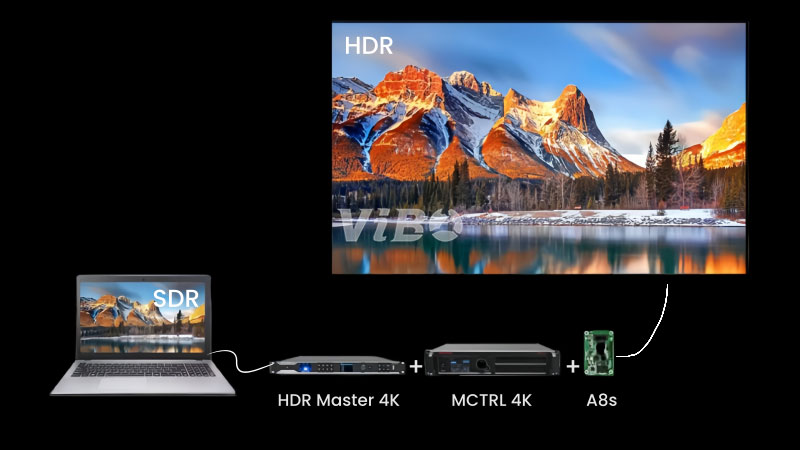
NovaStar has introduced a control system capable of handling HDR sources, perfectly solving the application challenges of HDR in the LED field.
For example, the MCTRL4K utilizes HDR10-Optima HLG to achieve a high dynamic range display.
(1) Why HDR Is Especially Effective on LED Displays
LED displays are naturally suited for HDR performance due to their technical characteristics:
- High brightness capability allows LED screens to display intense highlights without losing detail.
- Excellent contrast control helps maintain clear shadow details in dark scenes.
- Wide color gamut enables more accurate and vibrant color reproduction.
These features make HDR more than just a specification.
It becomes a visible and practical improvement in real-world LED applications.
(2) Key Application Scenarios for HDR LED Displays
HDR technology is now widely used across various LED display scenarios:
- Commercial advertising LED screens
HDR enhances visual impact, making images and videos stand out even in bright environments.
- Stage and live event displays
Complex lighting effects, spotlights, and shadows are rendered more accurately, improving the overall stage presentation.
- Virtual production and XR studios
HDR improves realism and depth. HD virtual production LED wall creates immersive digital environments for filming and broadcasting.
- Sports LED displays
Fast-moving content combined with high contrast lighting benefits greatly from HDR, ensuring clearer details and better visibility.

In these scenarios, HDR helps LED displays deliver not only brightness and scale, but also visual depth and realism.
(3) HDR and UHD for Small Pixel LED Screens
While HDR enhances image quality, UHD resolution ensures clarity and detail, especially on large-format LED walls.
When combined, UHD + HDR LED displays offer:
- Sharp image detail across large viewing areas
- Strong contrast and realistic lighting effects
- A more immersive and professional visual experience
In the LED display industry, HDR is no longer a premium add-on—it is becoming a core visual technology.
HDR-enabled LED displays deliver clearer, brighter, and more lifelike visuals across a wide range of applications.
Part 9: FAQs
- Q1. 4K UHD vs 4K HDR — Which Is Better?
Neither is strictly better. 4K UHD improves image sharpness, while 4K HDR enhances brightness, contrast, and color.
- Q2. What’s the Difference Between HDR and UHD?
UHD refers to resolution, which affects how clear and detailed an image looks.
HDR refers to image quality, improving brightness, contrast, and color depth.
In short, UHD controls clarity, while HDR controls realism.
- Q3. Is HDR the Same as 4K?
No. HDR and 4K are not the same.
4K describes resolution (pixel count), while HDR is a display technology that improves image quality. A 4K display may or may not support HDR.
- Q4. Does HDR Mean Better Quality?
In most cases, yes. HDR usually provides better perceived image quality, especially in scenes with strong light and shadow contrast.
- Q5. Are All UHD Displays HDR?
No. Not all UHD displays support HDR.
UHD only defines resolution, while HDR requires additional hardware and processing capabilities.
- Q6. Do I Need a Special HDMI Cable for 4K HDR?
In most cases, a High Speed HDMI cable (HDMI 2.0 or higher) is sufficient for 4K HDR.
For higher refresh rates or advanced formats, an Ultra High Speed HDMI (HDMI 2.1) cable is recommended.
Part 10. Conclusion
HDR and UHD improve the visual experience in different ways.
UHD increases resolution and clarity, while HDR enhances brightness, contrast, and color realism.
Rather than choosing between them, combining UHD + HDR delivers the most balanced and immersive viewing experience.
Authoritative Reference:
More Posts For You:
Drone Billboard Explained: The Future of Aerial Advertising
Common Anode vs Common Cathode: A Brief Comparison

